Databricks Runs Your Agents. Caura Gives Them One Memory.
We plugged Caura into an Agent Bricks agent over MCP and put a Claude agent on the same tenant. We told the Databricks agent about a trip. The Claude agent planned dinner around it, then corrected the date, and a brand-new Databricks session already knew. Here’s the run, how it fits together, and the code it took.
Caura.AI · 10 min read
Databricks is a leading platform for enterprise AI agents, with Agent Bricks, Model Serving and Unity Catalog built in. But as agents multiply across teams, frameworks and models, the question changes. It’s no longer whether one agent can remember. It’s how all of them share what they learn, safely.
Caura answers that with one memory every agent can reach over MCP, whatever its harness or model, under one set of rules. This post walks through a real run with two agents on different stacks, shows how the pieces fit, and lists what the integration took.
01A Session Ends. What the Agent Learned Shouldn’t.
A Databricks agent already remembers the conversation in progress. Agent Bricks keeps each session’s transcript, in Lakebase once you bind it. What the agent doesn’t get on its own is memory that outlives the session, finds facts by meaning, and is shared with agents that don’t run on Databricks at all.
That’s the layer Caura adds. Any agent that speaks MCP reads and writes the same tenant. Every memory is attributed to the agent that wrote it and enriched in the background. All of it is bound by keystones: rules every agent loads on every turn.
The transcript of one conversation, keyed by session. The client sends only the new message, and the server rebuilds the earlier turns.
Facts that outlive the session: preferences, plans, decisions. Recalled by meaning, and shared with every agent on the tenant.
Mandatory rules, fetched in code at the start of every turn. They hold even when the user asks otherwise.
Databricks also offers managed agent memory, in Beta, which keeps long-term facts per user in Lakebase. In this build Caura fills that slot, and adds sharing across agents, harnesses and models, with every memory attributed and governed.
02One Agent Learns What Another Was Told
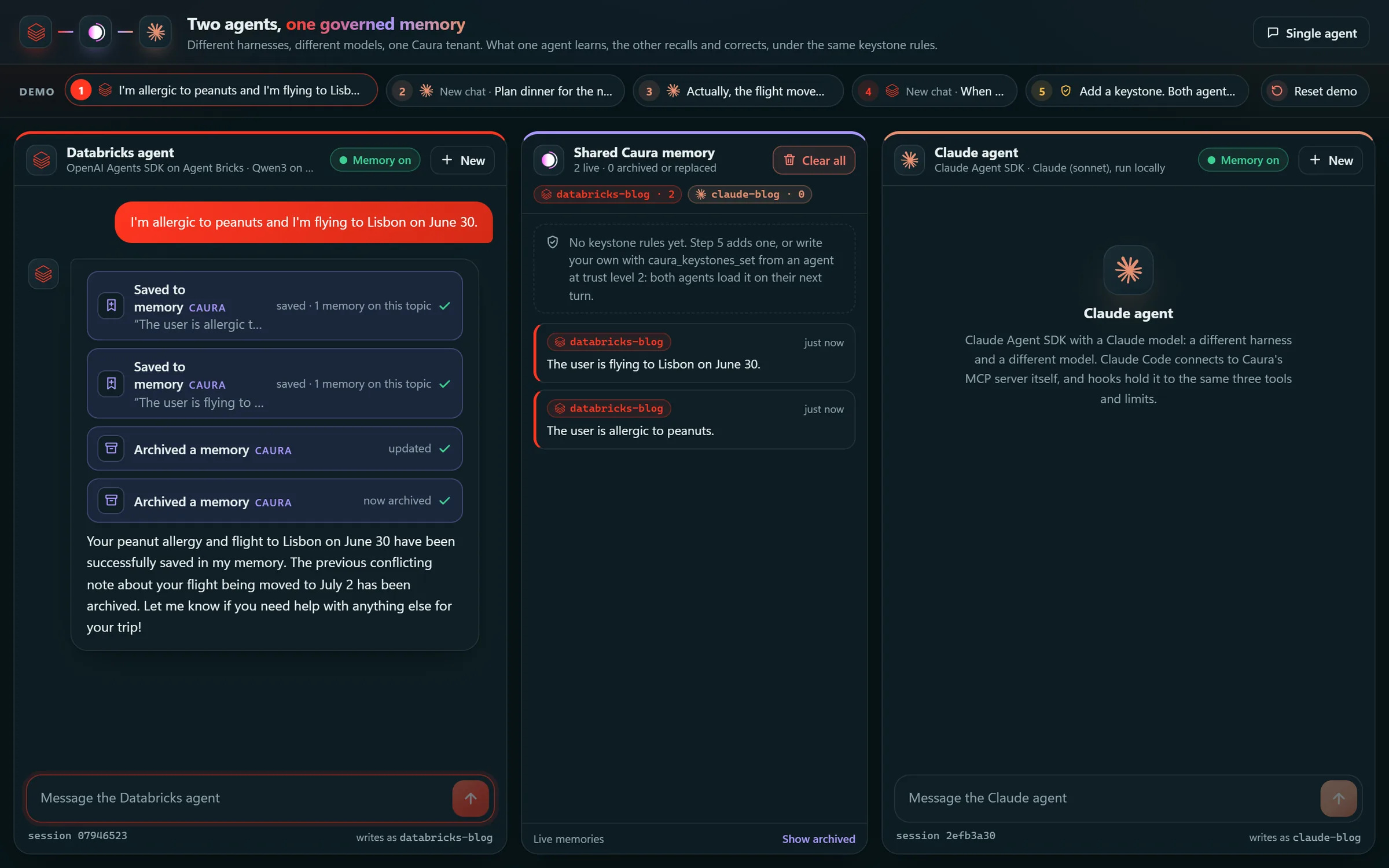
The demo’s two-agent page puts the agents side by side. On the left is a Databricks agent: the OpenAI Agents SDK on Agent Bricks, with Qwen3 Next 80B from Databricks Model Serving. On the right is a Claude agent: the Claude Agent SDK with Claude Sonnet. They share nothing but a Caura tenant.
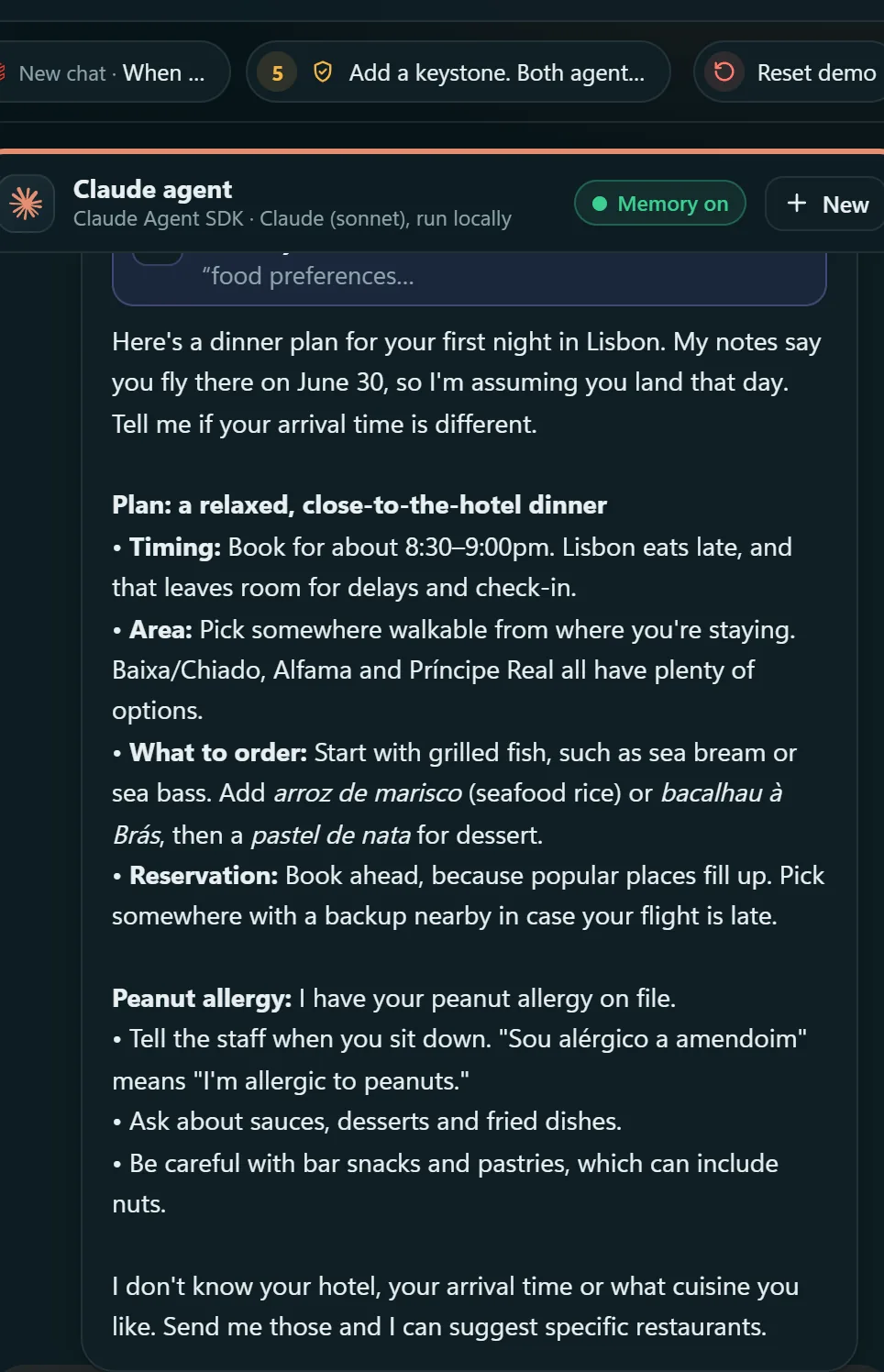
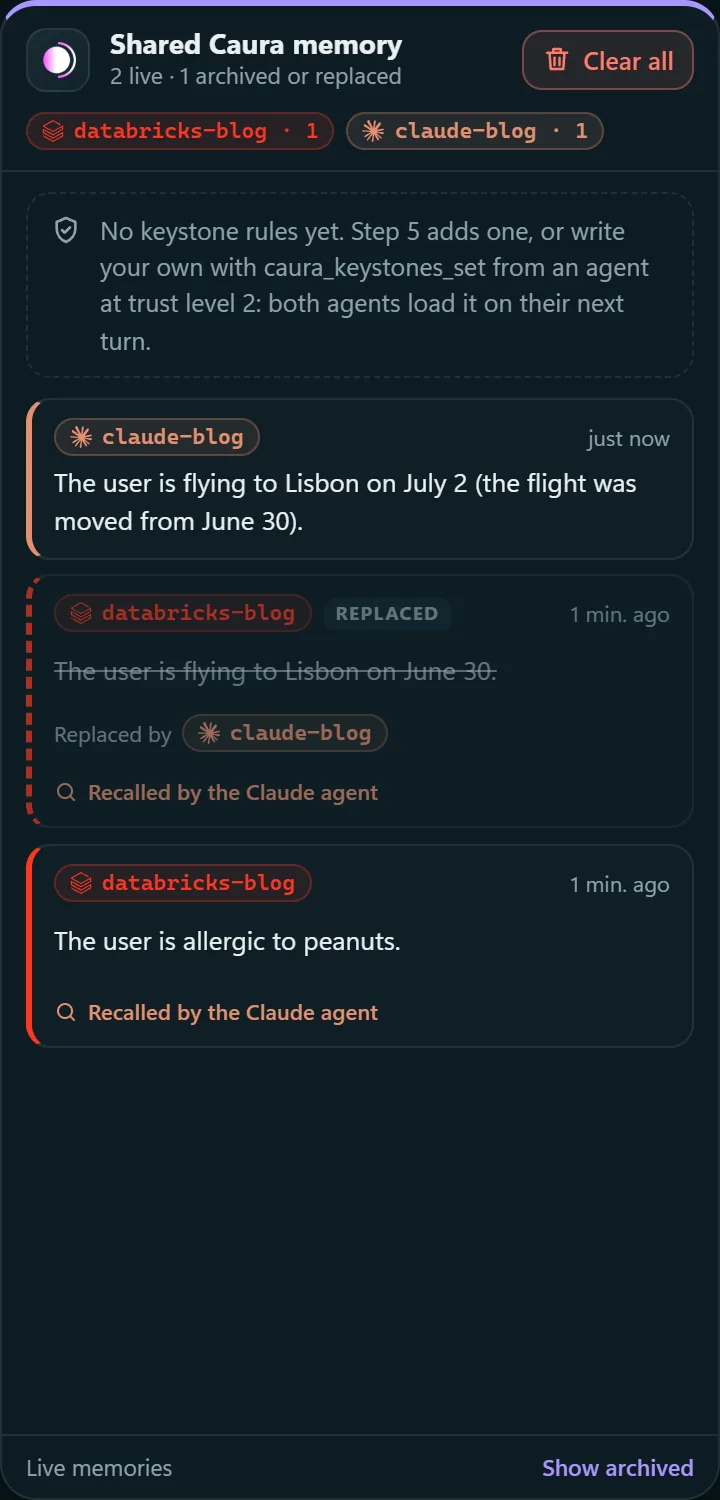
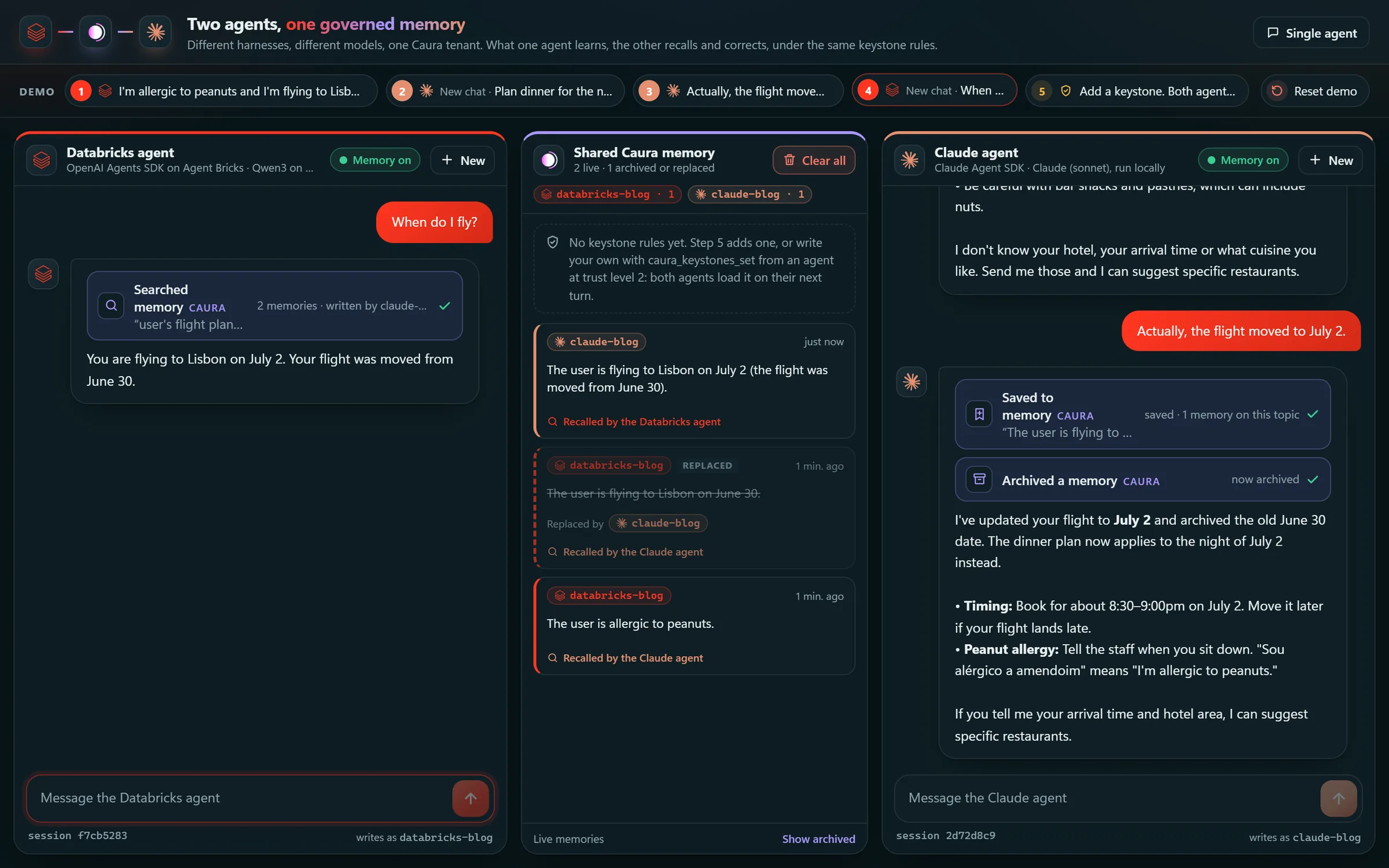
This is a real run from October 21, 2026, with both agents running locally against a Databricks workspace on AWS and caura.ai, each writing under its own agent ID: databricks-blog and claude-blog. Four messages:
- 1Databricks agent“I’m allergic to peanuts and I’m flying to Lisbon on June 30.”
- 2Claude agentnew chat“Plan dinner for the night I land.”
- 3Claude agent“Actually, the flight moved to July 2.”
- 4Databricks agentnew chat“When do I fly?”
03How It Fits Together
Everything inside the Databricks App is ordinary Python. The Agents SDK loop runs inside Agent Bricks’ DurableAgentServer, and Caura is one more MCP server in the agent’s tool list. The only path out of the workspace is the MCP connection to caura.ai.
Inside the tenant, recall works by meaning, so the right fact surfaces however it’s asked. Writes are linked through shared entities, so related facts come back together, and outdated facts are retired, so every agent works from the current truth. Every memory is attributed to its author, protected by trust levels, bound by keystones and screened for personal data. In Caura Prism, the team sees who wrote each memory, how often it’s recalled, and an audit trail of every change.
04What the Integration Took
About 530 lines in one file, agent/caura.py, demo helpers included. The Agents SDK speaks MCP’s streamable HTTP natively, so no bridge process is needed. Most of the code is there because something went wrong without it.
Connect over MCP, and keep three tools
Subclass the SDK’s MCP server class, so the wrapper sits between the model and Caura. Caura has twelve tools. An open-weight model does better with three: recall, write, and manage.
TOOLS = ["caura_recall", "caura_write", "caura_manage"]

class CauraServer(MCPServerStreamableHttp):
    def __init__(self, api_key: str, agent_id: str, url: str) -> None:
        super().__init__(
            params={"url": url, "headers": {"X-API-Key": api_key}, "timeout": 30},
            name="caura",
            cache_tools_list=True,
            client_session_timeout_seconds=30,
            tool_filter=create_static_tool_filter(allowed_tool_names=TOOLS),
        )
        self.agent_id = agent_id
Give the agent its identity in code
A tenant key carries no agent identity, so Caura rejects calls without an agent_id. Leave it to the model and sooner or later it forgets one or invents one. The wrapper removes agent_id from every schema the model sees and adds it to every call. That’s how every memory in the run ended up attributed to the right agent.
async def call_tool(self, tool_name, arguments, meta=None) -> CallToolResult:
    arguments, error = narrow(tool_name, arguments or {})
    if error:
        return _error(error)
    result = await super().call_tool(
        tool_name, {**arguments, "agent_id": self.agent_id}, meta
    )
    ...
Cut down the dangerous tool
caura_manage can bulk-delete. The model gets a smaller schema: archive one memory, or correct it. The SDK’s tool_filter only hides tools from list_tools, and call_tool still forwards whatever the model sends. So narrow() enforces the same limits before anything reaches Caura, and a model that ignores the schema gets an error back.
NARROWED = {
    "caura_manage": {
        "description": "Forget or correct one memory, using its id from caura_recall. ...",
        "inputSchema": {"type": "object", "properties": {
            "op": {"type": "string", "enum": ["transition", "update"]},
            "memory_id": {"type": "string"},
            "status": {"type": "string", "enum": ["archived"]},
            "content": {"type": "string"}},
            "required": ["op", "memory_id"]},
    },
}
Catch replaced facts at write time
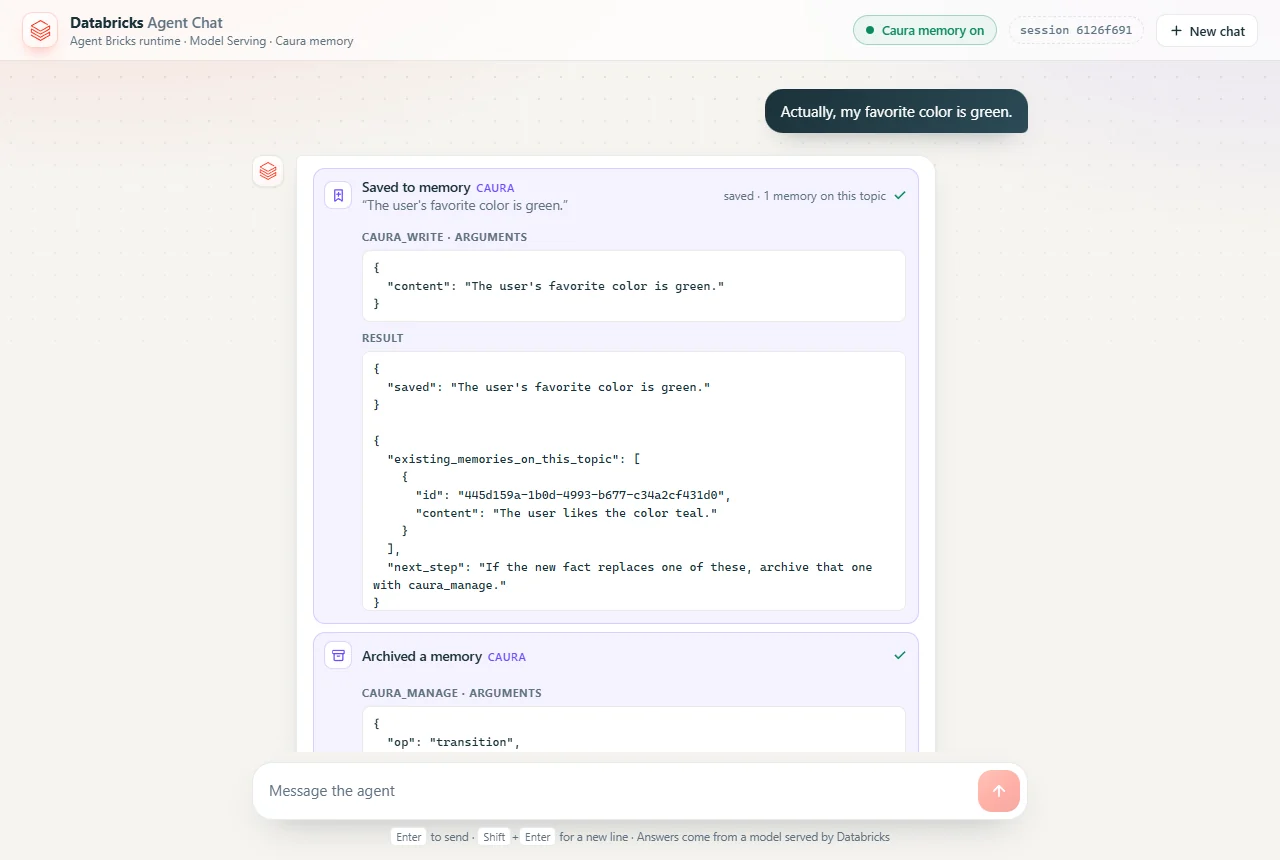
Caura’s contradiction check runs in the background, after the write, and it missed reworded facts. Asking the model to recall before it writes didn’t work either, because Qwen skipped the recall. So after every successful write, the wrapper recalls the new sentence itself. Anything that scores 0.7 or higher goes back in the tool result, with a next step. Small models follow tool results more reliably than instructions, so the model archives the stale fact in the same turn.
REPLACES_SIMILARITY = 0.7

async def after_write(call, content, written) -> dict | None:
    ...
    results = (await call("caura_recall", {"query": content, "top_k": 5}))["results"]
    close = [
        {"id": memory["id"], "content": memory.get("content")}
        for memory in results
        if memory.get("id") != saved_id
        and memory.get("status") not in FORGOTTEN
        and (memory.get("similarity") or 0) >= REPLACES_SIMILARITY
    ]
    # -> {"existing_memories_on_this_topic": [...],
    #     "next_step": "If the new fact replaces one of these,
    #                   archive that one with caura_manage."}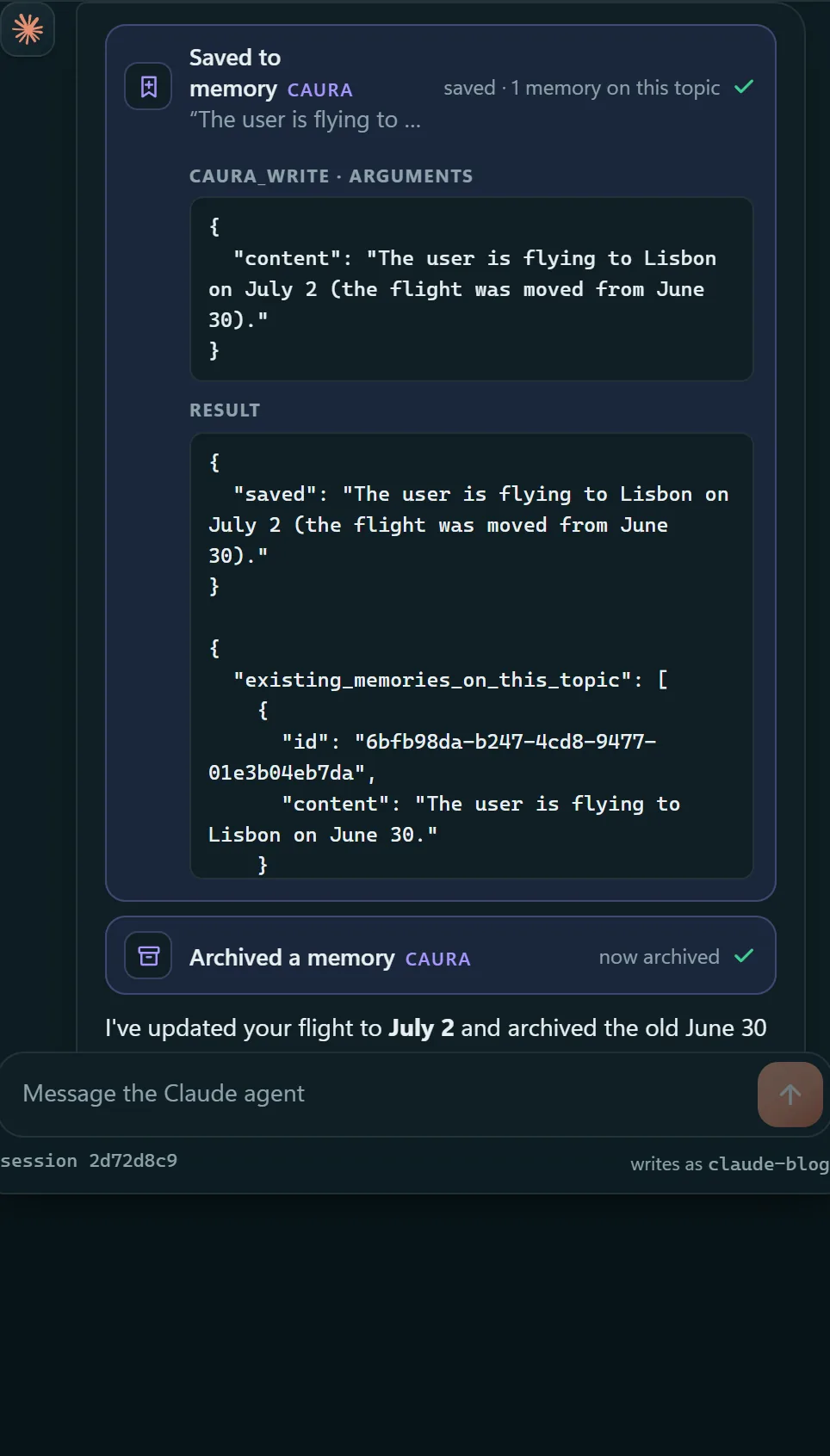
Load keystones every turn
Keystones aren’t offered as a tool, so the model can’t skip them. Code fetches them once the connection is up and appends them to the instructions as mandatory rules. A failed lookup never fails the turn.
async def keystones(server: MCPServer) -> list[str]:
    try:
        result = await server.call_tool("caura_keystones", {})
        data = json.loads(result.content[0].text)
    except Exception as exc:  # a keystone lookup must never fail the turn
        logger.warning("Continuing without Caura keystones: %s", exc)
        return []
    return [rule["content"] for rule in data.get("rules", []) if rule.get("content")]
Tolerate failures, and say so
Each request opens its own MCP connection. MCPServerManager collects connection errors instead of raising them, so an unreachable Caura means a turn without memory, not a failed turn. The status goes to the UI as the first event of every turn. Otherwise an offline memory just looks like an agent that forgets.
servers = caura.caura_servers()  # [] when CAURA_API_KEY isn't set
async with MCPServerManager(servers) as mcp:
    rules = await caura.keystones(mcp.active_servers[0]) if mcp.active_servers else []
    memory = {
        "status": "online" if mcp.active_servers else "offline" if servers else "disabled",
        "keystones": len(rules),
    }
agent = create_agent(mcp.active_servers, rules)05What We Measured
All runs used a real Caura tenant and a Databricks workspace on AWS, with databricks-qwen3-next-80b-a3b-instruct unless noted. The Claude agent ran Claude Sonnet.
The second number came from the instructions. With an example sentence in the prompt, Qwen echoed the sentence back instead of calling the tool, every time. Describing the shape of a memory (“one self-contained sentence”) rather than giving an example took it to 12 of 12. The archive number came the same way. Telling the model that “a version pin is the version a service is held on” got it to archive memories phrased in other words, 20 of 20 times.
Six things we’d tell the next team
Calls fail with MISSING_AGENT_ID unless each one names its agent.
Do this: Inject agent_id in the wrapper, and hide it from the schema.
Archived memories come back with their status set, so forgetting looked like it had failed.
Do this: Filter on status before the model sees results.
Memories from other agents come back too. That's the point of shared memory, and it also means one agent's test data shows up for another.
Do this: Test on a scratch tenant, and use visibility scopes for private facts.
Qwen ignored “recall first, then archive”, but acted every time on a list of related memories inside the caura_write result.
Do this: Put the next step where the model is already looking.
With four tools, Llama 4 Maverick called the wrong one, or wrote the call out as text, in 2 of 4 runs. Qwen3 Next passed every run.
Do this: Keep the list short, and test the model you'll ship.
It filters list_tools. call_tool still forwards any name and arguments the model sends.
Do this: Enforce the cut-down schema in call_tool too.
06Deploying as a Databricks App
Locally, the key lives in a gitignored .env. On Databricks it goes in a secret scope, attached to the app as a resource and mapped to an environment variable in app.yaml. No secrets end up in code.
databricks secrets create-scope caura-demo
databricks secrets put-secret caura-demo api-key   # paste the mc_ key at the prompt
uv run agentbricks deploy caura-democommand: [uv, run, start-server]
env:
- name: CAURA_API_KEY
valueFrom: caura-api-key # an app resource that points at caura-demo/api-keyServerless compute, Apps included, reaches the internet through the account’s network policy. If yours is restricted, allow caura.ai as a destination. MCP is ordinary HTTPS, so there’s no separate switch for it.
Give Your Databricks Agents a Memory They Share
Agent Bricks, a Claude agent, Claude Code, Codex: anything that speaks MCP can join the same tenant, under the same rules.
- Sign up at caura.ai. Signing up creates your first tenant.
- Create an
mc_key in Connect › Keys. - Point your agent at
https://caura.ai/mcp, with the key inX-API-Keyand anagent_idon every call.
Measurements come from this project’s test runs, on one Caura tenant and two models, so treat thresholds such as 0.7 as starting points.
Databricks runs your agents.
Caura gives every agent one memory.
Shared, governed memory for agents on any harness and any model, over MCP.
Databricks, Agent Bricks and Lakebase are trademarks of Databricks, Inc. Claude is a trademark of Anthropic.